User
Managing RZBNeo-Accounts
Under this menu item, all existing users can be managed. Here you can create new users, edit existing users, and reset individual users' passwords.
To create a new user, click on Add entry below the table.
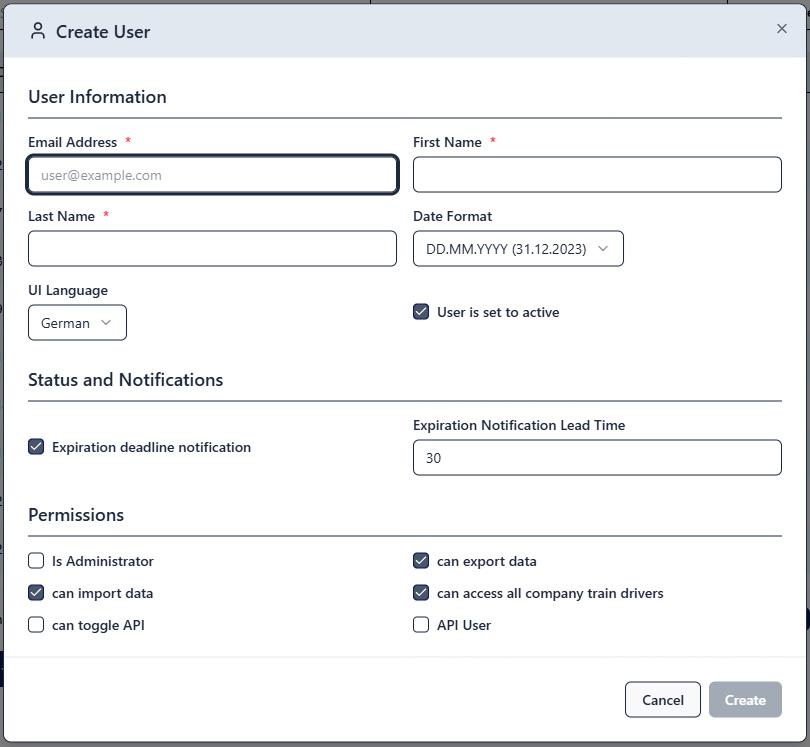
Procedure:
- Enter the user's email address
- Enter the user's name
- Important: Activate the user by checking the User is set to active checkbox
- Should the user be able to see the deadline overview? If so, check the Expiration Deadline Notification checkbox.
- If you have checked the Expiration Deadline Notification checkbox, enter a lead time for expiring deadlines in days in the corresponding field.
- The Date format field only needs to be filled in if the DD.MM.YYYY format is not to be used. Alternatively, YYYY-MM-DD is possible.
- Specify whether the user should receive full administrator rights. If the user does not receive administrator rights, you must subsequently define access and editing rights in the Permissions administration table after adding the user.
- Select whether the user should be able to export and/or import data.
- Specify whether the user can access all existing train drivers regardless of which organisational unit they are assigned to, or only those in the organisational unit for which the user has access authorisation (not relevant if the user receives administrator rights).
- The Can toggle API user and API user fields do not need to be taken into account.