02-2026 Form Distribution and Document Storage
Sending forms directly to the Eisenbahnbundesamt
What's new?
When generating forms via the train driver table, it is now possible to send certain forms directly to the Eisenbahnbundesamt from within RZBneo. Manual intermediate steps (downloading, opening your own email program, selecting the recipient, etc.) are no longer necessary.
This function is intended for the following forms:
- Declaration of the start of employment as a train driver
- Declaration of the end of employment as a train driver
- Declaration of the regular general professional competence check
Prerequisites
Storing contact person details per organisational unit For each organisational unit, the contact persons within the company must be stored by an administrator before the automatic sending function is used for the first time. This can be done via the Administration -> Issuing organisational units menu item and by editing the corresponding organisational unit.
Controlling which forms may be sent automatically A new option is available in the form management that allows forms to be marked as approved for automatic sending to the EBA. This setting can only be changed by an administrator. Only forms marked accordingly can be sent directly from RZBneo by email. By removing the flag, automatic sending can be deactivated for individual forms at any time.
What are the benefits?
- Time saving: No more manual creation and sending of emails — sending is done directly from RZBneo.
- Fewer sources of error: The EBA contact's email address is stored centrally; typos in addresses or incorrect recipients are avoided.
- Better traceability: The preview form allows you to see the most important form data at a glance and adjust the sending date as needed.
- Flexibility: Using the form option, you control which forms are to be sent automatically and which are not.
Central updating of EBA forms
What's new?
From now on, updated forms from the Eisenbahnbundesamt are automatically made available in all instances. These centrally managed forms cannot be edited individually. This ensures that the latest version of the form is always available.
The following forms are centrally managed:
- Declaration of the start of employment as a train driver
- Declaration of the end of employment as a train driver
- Declaration of the regular general professional competence check
- Application for the issuance of a train driver's licence
How to use an individual form
To customise a centrally managed form, you can create a copy of it and adjust it independently using the form editor. Please note that when the original form is updated, your individual form will not be updated and you will need to manually copy and adjust it again.
Revised document storage
What's new?
The document storage in RZBneo previously allowed you to store documents (attestations, certificates, audit journals, etc.) centrally in the system and assign them to a train driver. From now on, the document storage additionally offers the option of linking documents directly to the train driver's skills and monitoring items.
How to use the new document storage
Via the Documents menu item As before, you will find all previously uploaded documents in the Documents menu item. By editing existing entries, you can now also link them retrospectively to skills and monitoring items.
Via the train driver base data In the base data, alongside existing skills and monitoring items, you will now find either an icon 

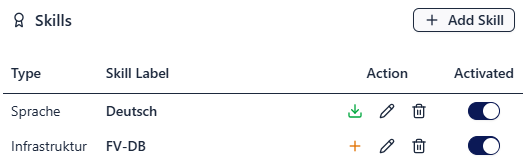
Alongside the familiar button for displaying the train driver's documents, which opens the documents table, there is now a button for managing the train driver's documents. The view that opens provides an overview of all existing documents for the train driver and also allows further files to be added. The complete package for the train driver can also be downloaded here.

Usage notes
- Free designations and description texts can still be stored for documents.
- The date of the document should correspond to the acquisition date (if it is proof of the acquisition of a skill) or the date of the last audit, in order to establish the link between the document and the completed audit.
Managing forms via the issuing organisational unit
What's new?
Forms for the supplementary certificate and the associated attestation can now be managed centrally per issuing organisational unit. The existing option of storing forms individually per user remains in place. However, if a form is provided via the organisational unit, the manual selection when issuing a supplementary certificate is no longer necessary — the system automatically uses the stored form.
What are the benefits?
If different organisational units within your company use different forms, this new feature ensures that the correct form is always used when issuing a supplementary certificate. You also benefit from centralised and significantly simpler maintenance: form changes, version updates, or content adjustments only need to be made in one place and take effect immediately for all associated users. This reduces errors, saves time, and increases process reliability.