RZBneo generally follows a tabular structure; that is, there are separate tables for different data categories, which can be accessed via the main menu on the left-hand side.
For example, the Train Drivers table allows you to edit the master data for all train drivers and create new employees, while the Supplementary Certificates table lets you issue new certificates and manage existing ones, and so on.
To add new entries to a table (e.g., train drivers, skills, supplementary certificates, etc.), there is always a button  below the respective table for creating new entries.
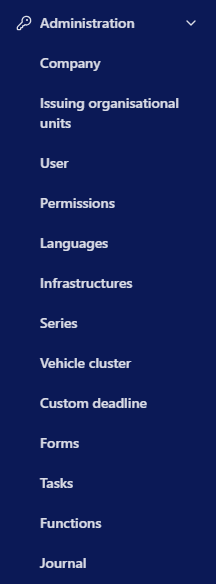 Designations for skills (languages, vehicle series, infrastructure, vehicle clusters, and other monitoring areas) are defined in the administration section (menu item Administration) in what are known as master tables. These designations can then be selected, for example, when adding a qualification to a train driver or from a list, thereby preventing data entry errors, duplicates, and variations in spelling.
❗
If a value is not available in the drop-down list, you must first enter it in the corresponding master table.
💡
The number of users who can edit the master tables should be limited as much as possible so that only a select group of people manages the available designations at any given time. This helps you avoid duplicates and incorrect designations. Editing permissions can be assigned using the permission system.